The short answer
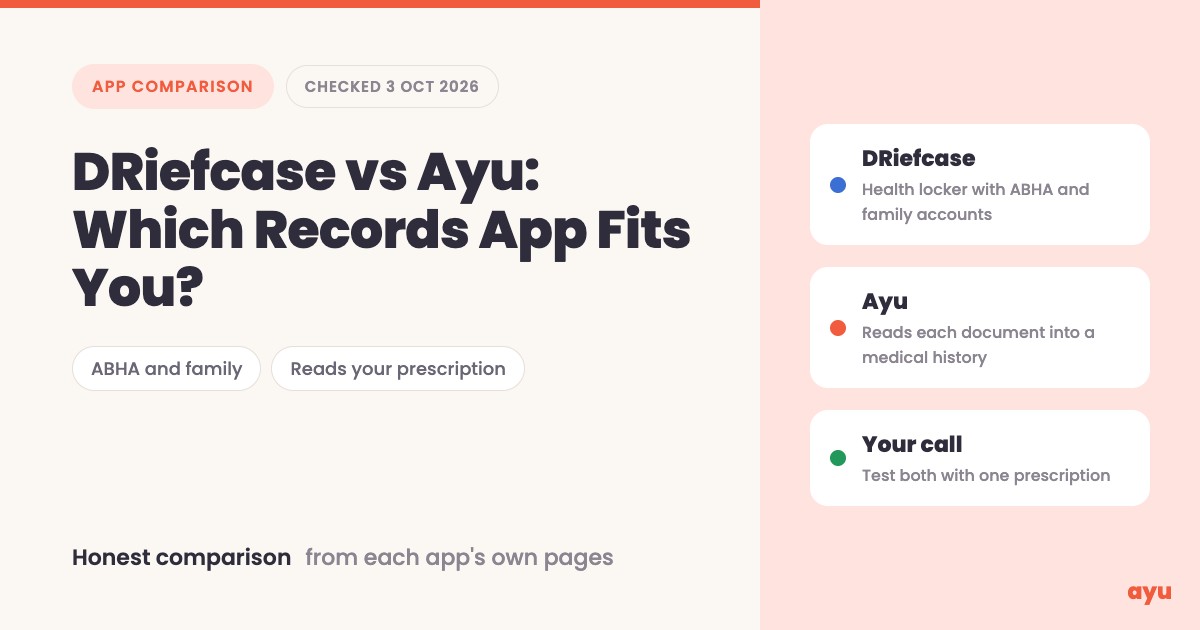
DRiefcase is the bigger, older health locker with ABHA and family accounts built in. Ayu is a newer app that reads what is inside each document and turns it into a medical history you can search and ask questions about. If you need an ABHA card and one login for the whole family today, pick DRiefcase. If your problem is a pile of prescriptions nobody can make sense of, try Ayu.
Disclosure first: we make Ayu, so we are not neutral. Everything about DRiefcase below comes from its own Play Store listing, App Store listing, website and privacy policy, plus what we saw when we installed version 6.05 on a test phone, all on 3 October 2026. Where we could not confirm something, we say so.
- Pick DRiefcase if you want ABHA creation, family profiles under one account, hospital-counter registration by ABHA QR, and upload by WhatsApp or email.
- Pick Ayu if you want the app to read the prescription for you: medicines, doses, doctor and date pulled out, placed on a timeline, and answerable in plain language.
Key takeaways
- DRiefcase has been on Google Play since 15 October 2016 and shows 10 million+ installs. Ayu has been there since 16 March 2025 and is much smaller.
- DRiefcase can create an ABHA and is on the National Health Authority's list of integrated PHR apps. Ayu's ABHA creation and linking is planned for November 2026 and is not live today.
- DRiefcase handles a family under one login. Ayu is one person on the free app; family profiles are its one paid plan, from ₹99 a month.
- DRiefcase's pages describe filing and tagging records. In our own test in October 2026, it kept a handwritten prescription as an image file without pulling out the medicines, doses or doctor. Ayu's AI is built to read handwritten and printed prescriptions, and can be wrong, so you check it against the original.
- On privacy, the two work differently. DRiefcase's policy allows anonymised data to go to contracted third parties, Play marks the app as containing ads, and on our test phone third-party ads showed on the home, ABHA and More screens. Ayu is free to use, has no ads and will not add them, and sends document content to AI providers with your consent.
Side by side
| DRiefcase | Ayu | |
|---|---|---|
| What it is | A health locker (PHR app) linked to ABDM | A medical records app that reads your documents with AI |
| Company | DRiefcase Health-Tech Pvt Ltd, Mumbai | Ayu, India |
| On Google Play since | 15 October 2016 | 16 March 2025 |
| Installs (Play) | 10 million+ | A newer, much smaller app |
| Play rating | 4.5 | 4.1 |
| App version we looked at | 6.05 | 0.2.12 |
| ABHA | Create an ABHA and link records. Listed on ABDM's PHR partner page (integration completed 6 August 2021) | Not live as of 3 October 2026. ABHA creation and linking inside Ayu is planned for November 2026 |
| Family | "Profiles of all family members within a single account" | One person on the free app. Family profiles are the one paid plan, from ₹99 a month |
| Adding records | Upload in the app, or send to its WhatsApp number or your dedicated email address | Camera, gallery photos or PDF |
| Reading what is inside | Its listing describes arranging, indexing and tagging. Handwritten prescriptions: did not read ours (our test, Oct 2026); the image was kept as a file | AI reads prescriptions, lab reports, scans, discharge summaries and bills, and sorts them by type, date and doctor |
| Medical history view | Record list with filters by doctor, lab, family member and document type | Medical History timeline grouped by month, plus a Documents tab |
| Ask questions about your records | Not mentioned | Yes. Answers draw on your uploaded records and are not medical advice |
| Sharing | With doctors, hospitals, labs, TPAs and insurers; ABDM consent | A link or QR code for a document that expires in 30 minutes |
| Reminders | Doctor visits, refills, vaccination appointments | Medicine reminders from a prescription |
| App languages | App Store lists English; its site has a Hindi toggle; on our test phone the first screen offered Hindi and English | 9: English, Hindi, Marathi, Tamil, Telugu, Kannada, Malayalam, Bengali, Gujarati |
| Ads | Play marks it "Contains ads"; on our test phone, third-party ads showed on the home, ABHA and More screens | Ayu has no ads and will not add them |
| Price | App is free. Paid add-ons such as Scan at Home at ₹1,000 (selected cities) | Ayu is free to use. The only thing Ayu charges for is the family plan, from ₹99 a month, which adds profiles for family members |
DRiefcase rows are its own claims from the pages in the references, read on 3 October 2026, except the handwritten-prescription result, which is from our own upload test in October 2026. "Not mentioned" means we did not find it on those pages, not that the feature is missing.
What each app is built for
DRiefcase describes itself on its About page as an ABDM-integrated personal health record platform that lets a user and their family keep medical records and reach them from anywhere. That is the company's own wording. The About page lists DRiefcase Health-Tech Private Limited at a Mumbai address, with Harsh Parikh and Sohit Kapoor as co-founders. It does not state a founding year. What we can confirm from the stores is that the app first appeared on Google Play on 15 October 2016, and that Play last updated it on 27 August 2026.
The company also makes a separate app for doctors, listed on Play as "DFC Connect (Doctors Only)". So the patient app sits inside a wider business that serves clinics too.
What does the business sell around the app? From the pages we read: paid scanning and collection services (more on those under price), advertising (Play flags the app as ad-supported, and the privacy policy mentions cookies used to display offers and advertisements), and, per the privacy policy, anonymised data given to contracted third parties for analysis, monetization, training and modelling. We did not find a subscription for the locker itself.
Ayu is built around one idea: the paper you already have should become something you can read, search and ask about. It is a newer, smaller app, on Google Play since 16 March 2025. Ayu is free to use, has no ads and will not add them. The only thing it charges for is the family plan, from ₹99 a month. It is not an ABDM-integrated PHR today, and it has no hospital-counter features for the general public. The nearest thing is that, if your clinic uses Ayu, you can scan that clinic's QR code to book and answer the doctor's pre-visit questions.
That difference in purpose explains most of what follows. DRiefcase's strengths are plumbing: ABHA, consent, family, counters. Ayu's are comprehension: reading, ordering and answering.
Feature by feature
Getting records in
DRiefcase is built like a well-organised filing cabinet. You upload a document, it is arranged by doctor, type, date and hospital, and you find it later with filters. You can also send records to DRiefcase's WhatsApp number or to a personal email address it gives you, which is handy when a lab emails a PDF. For paper, it sells a Scan at Home service in selected cities and a pick-up and drop service across India.
Ayu treats the photo as something to read. You scan with the camera, or upload photos and PDFs. The AI pulls out the doctor, the clinic, the condition and each medicine with its timing, then places the visit on your medical history. Each uploaded document also gets a plain-language summary.
Adding one prescription
 DRiefcase
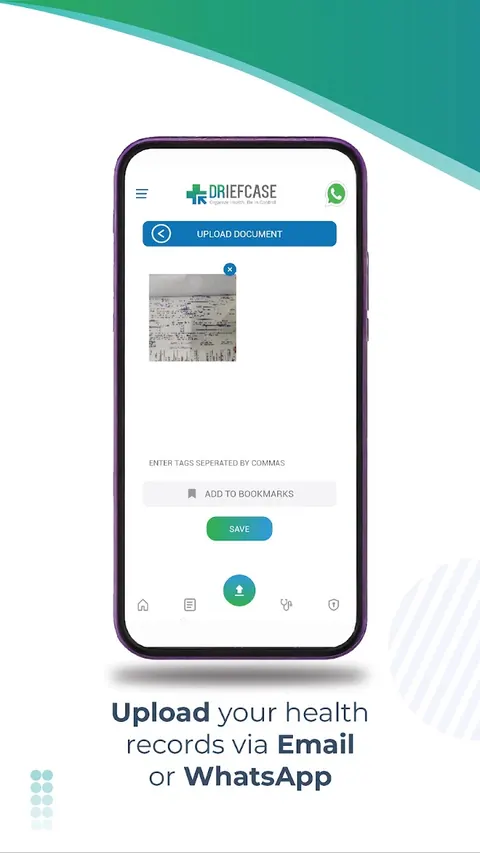
Upload screen from DRiefcase's listing: attach the file, add tags, save.
 Ayu
Ayu


A photo becomes medicines, doctor and date on a timeline.
- 1 Photograph it
- 2 Ayu reads it
- 3 It joins your history
Reading what is inside
This is the real difference between the two apps.
Its Play listing, App Store listing and website describe uploading, arranging and tagging records. We uploaded handwritten prescriptions to DRiefcase ourselves in October 2026. In our test it did not read the handwriting: it kept the image as a file, without pulling out the medicines, doses or doctor. Along the way it offered us something to buy: a Lab Test tile, a paid doctor-consult banner and third-party ads on the home screen. Apps change; try one of your own prescriptions.
Ayu's AI is built to read handwritten as well as printed prescriptions; it can still get a word or a dose wrong, so check the extracted details against the original, which stays in the app next to the extracted version. The check takes a few seconds. We do not publish an accuracy figure because we do not have one we can stand behind.
Finding a record later
DRiefcase gives you a filter screen: doctor or lab name, family member, type of document, date range and your tags. The record list also has a search box and a bookmarks tab. If you remember how you filed something, you will find it fast.
Ayu gives you three routes. Browse the Documents tab, scroll the month-by-month Medical History, or search by name, doctor or hospital, where matching is forgiving of spelling. Ayu has no filters. Or type a question such as "what did the doctor prescribe for my cough in June?" and Ayu answers from your uploaded records.
The medical history view
DRiefcase's screens show a list of records, each with a doctor or lab, a type such as prescription or OP consultation, and a date. It is a list you filter. We did not see a timeline view in the listing screenshots or its text.
Ayu's Medical History groups records under months, newest first. A month strip sits above the list. As you scroll, the strip moves to the month you are reading, and tapping a month jumps the list there. There is also a year view. AI groups related documents, such as a prescription, a report and a scan from the same illness, into one event. It can get this wrong, so you can open the documents inside an event to check.
Finding a record later
DRiefcase
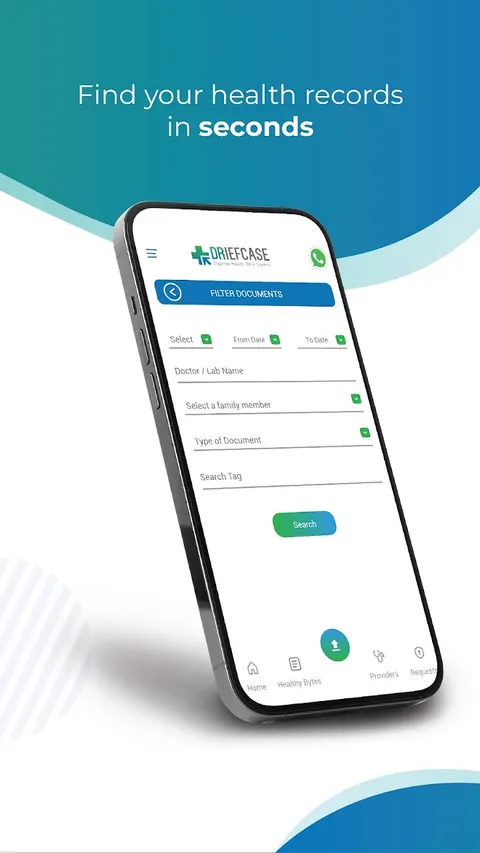
Filter by doctor, lab, family member, document type and tag.
Ayu
Scroll your history. The month strip follows as you go.
Asking questions about your records
DRiefcase's pages do not mention a chat or question feature.
In Ayu, "Ask Ayu" answers draw on your own records and can show the Sources, meaning which of your documents were used. You can attach up to three photos, files or items from your own history to a question. You can tap the mic to dictate, long-press an answer to hear it read aloud, and tap suggested follow-up questions. Chat asks for your consent to AI features first, and it needs an internet connection. Answers are not medical advice.
Sharing with a doctor
DRiefcase's listing says you can share health documents with doctors, hospitals and clinics, diagnostic labs, TPAs and health insurers, and its screenshot shows a Share dialog with two choices: "Share as attachment" and "Share through DRiefcase". Consent to share is handled over ABDM for linked records. That matters if the receiving party is on the ABDM network.
Ayu shares one document at a time with a link or a QR code. The link expires after 30 minutes. Sharing is per document, not "my whole history".
Reminders and tracking
DRiefcase's listing mentions reminders for a doctor visit, refilling medicines and a vaccination appointment. It does not mention tracking a health value over time.
Ayu sets medicine reminders from a prescription, and you can ask in chat to set reminders and choose which medicines they cover. There is a blood-sugar log, and in chat you can say your blood sugar and Ayu shows a card to save the reading with the meal type. That is for sugar only. You can also ask Ayu to chart a value such as blood sugar or HbA1c over time. It is not a lab-trends dashboard; it is a chart you ask for.
Family
This is a clear DRiefcase win. Its listing says you can create profiles of all family members within a single account, and its listing screenshot of the My Family screen shows a list of profiles with an edit icon beside each. The listing does not state a limit.
On the free app, Ayu is one person per account. The only thing Ayu charges for is the family plan, from ₹99 a month, which adds profiles for family members.
ABHA and hospital counters
DRiefcase lets you create an ABHA and link your records to it. Its listing screenshot shows an ABHA card with a QR code inside the app. It is listed on the National Health Authority's ABDM partners page as a PHR app, with integration completed on 6 August 2021. In recent Play reviews, using the ABHA QR to get an OPD token at a hospital is the most common praise.
Ayu does not have ABHA live. ABHA creation and linking inside Ayu is planned for November 2026. If hospital registration by QR is why you want an app, read our ABHA health ID guide and ABHA login and card download troubleshooting first. The government's own ABHA app is another route: it now points you to Aarogya Setu 2.0, the National Health Authority's newer app, where ABHA services continue. Both are public infrastructure built for exactly this, and a records app such as Ayu complements them rather than replacing them.
Languages
DRiefcase's App Store page lists English only, its website has a Hindi toggle, and the first screen on our test phone offered a choice of Hindi or English. The Android language list is not published in store data we could read.
Ayu is available in 9 languages: English, Hindi, Marathi, Tamil, Telugu, Kannada, Malayalam, Bengali and Gujarati.
Opening DRiefcase for the first time
We installed DRiefcase 6.05 on a Redmi Note 10, looked at the first screen, then logged in and went through the home screen and tabs. Everything below is "on our test phone on 3 October 2026". Account details are painted out of the images. One limit: we did not capture the inside of the Health Records locker or the upload flow, so for those we use DRiefcase's own Play listing images and say so in the label.
DRiefcase, from first launch to its tabs
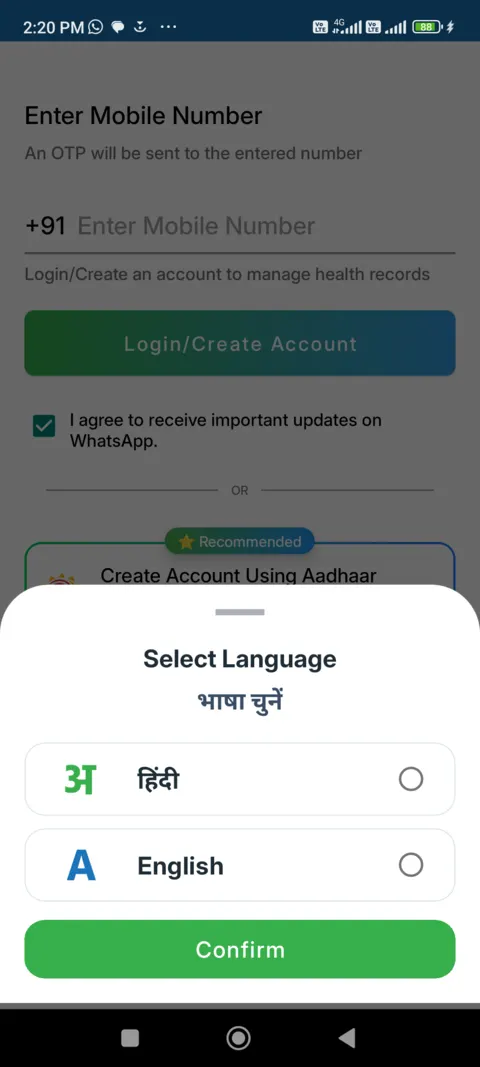
1 First launch
Pick Hindi or English; behind it, a mobile number field and a recommended Aadhaar sign-up
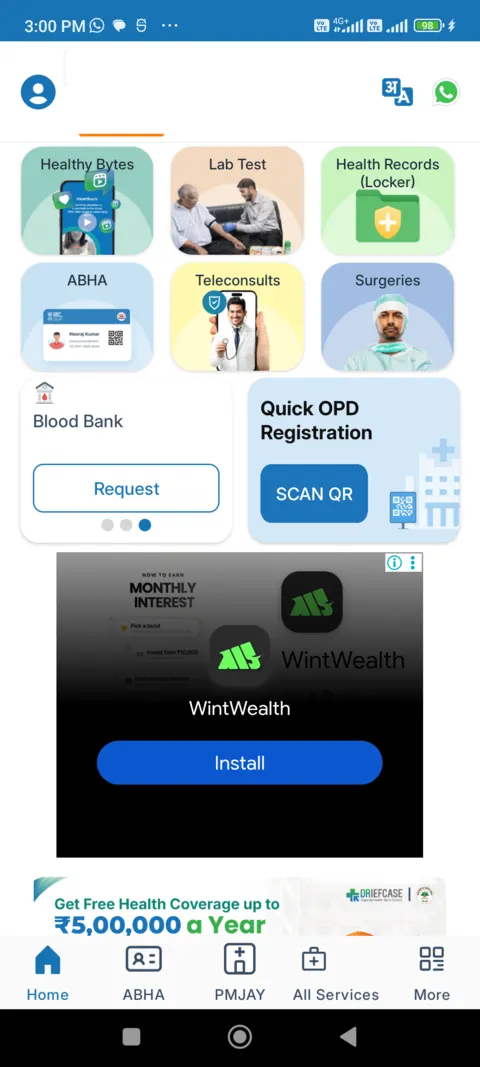
2 Home, top
Six tiles, one of them Health Records (Locker); a third-party ad directly below; then a health-coverage banner
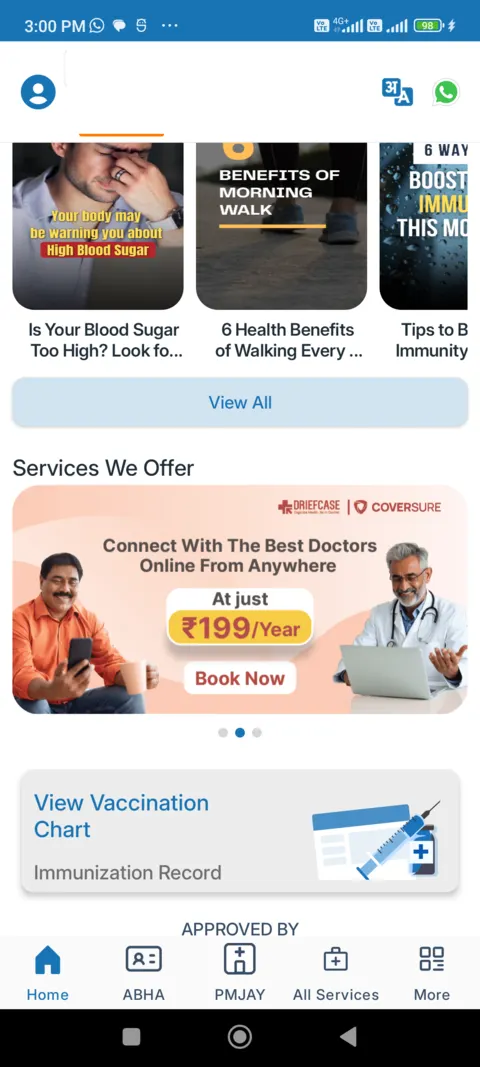
3 Home, scrolled
Healthy Bytes articles and a banner offering online doctor consults at Rs 199 a year
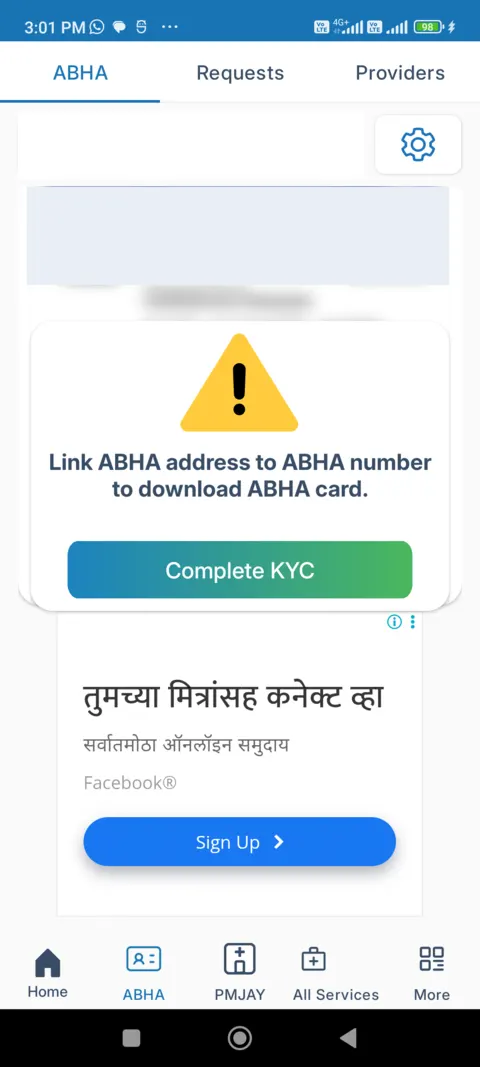
4 ABHA tab
A prompt to link your ABHA address to your ABHA number, with a third-party ad below it
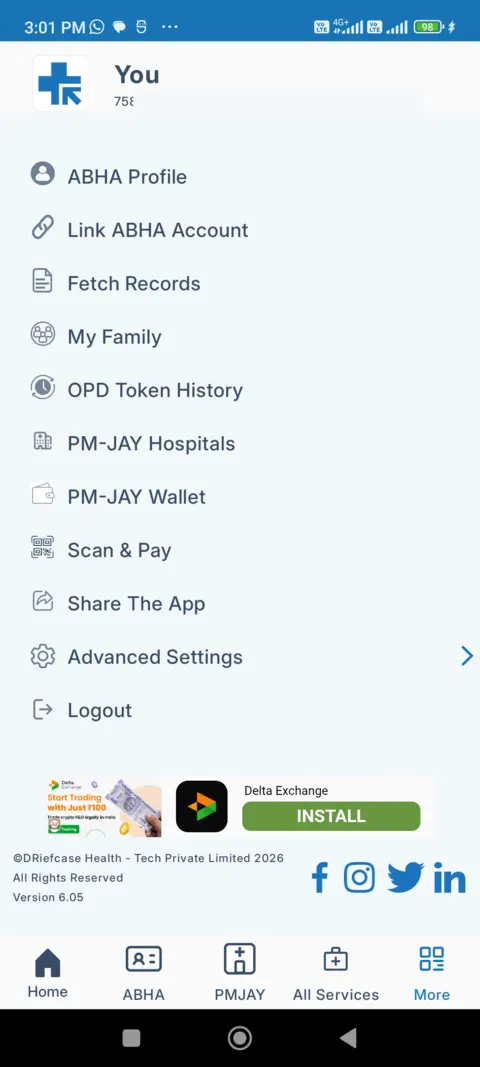
5 More tab
ABHA Profile, Fetch Records, My Family, OPD Token History, PM-JAY items; an ad at the bottom
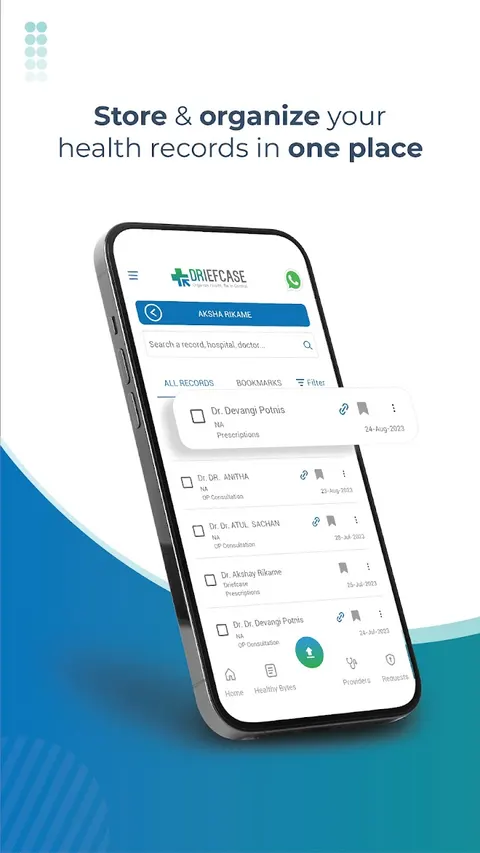
6 Record list (from its Play listing)
We did not capture the locker itself; this is the listing's image: search box, All Records and Bookmarks tabs
What the first screen showed, before any sign-in:
- A language choice. A sheet offers Hindi or English.
- A mobile number and an OTP. The login screen says an OTP will be sent to the number you enter, with a "Login/Create Account" button.
- A tick box. "I agree to receive important updates on WhatsApp" was already ticked when we saw the screen.
- An Aadhaar option. Below the login button, "Create Account Using Aadhaar" is marked "Recommended". The mobile number route is the main button, and the Aadhaar route is the one the screen steers you towards.
After login, the home screen has six tiles: Healthy Bytes, Lab Test, Health Records (Locker), ABHA, Teleconsults and Surgeries. It also shows a Blood Bank "Request" link and a "Quick OPD Registration: SCAN QR" button. So the records locker is one of six entry points, and there is more on the home screen than records.
Ads and offers are visible. Third-party advertisements appeared on the home screen, on the ABHA tab and on the More tab on our test phone. The specific ads differ from session to session and come from an ad network, not from DRiefcase choosing them for you as far as we can tell. The home screen also shows a banner for free health coverage up to Rs 5,00,000 a year at PM-JAY empanelled hospitals, a Heart Rate card, Healthy Bytes articles, and a DRiefcase x Coversure banner offering online doctor consults at Rs 199 a year. The ABHA tab asks you to link your ABHA address to your ABHA number to download the card. The More tab lists ABHA Profile, Link ABHA Account, Fetch Records, My Family, OPD Token History, PM-JAY Hospitals, PM-JAY Wallet and Scan & Pay. Bottom tabs: Home, ABHA, PMJAY, All Services, More.
On the install itself, the package on our test phone was about 33 MB, and its manifest declares 33 Android permissions. Declared is not the same as granted: Android asks you at the moment of use for the sensitive ones. The list includes camera, microphone, precise and approximate location, storage read and write, notifications, activity recognition and an advertising ID. The list also has several advertising-related entries, which sits alongside Play marking the app as ad-supported. For a records app, it is worth looking at the permission prompts and denying what you do not need, such as location and microphone.
Where DRiefcase is stronger
We would rather you hear this from us than find out later.
- ABHA today. DRiefcase lets you create an ABHA and link records to it, and it is on the National Health Authority's list of ABDM-integrated PHR apps. Ayu does not have ABHA live yet.
- Family accounts. One login, a profile for each family member. Ayu is one person on the free app; family profiles are its one paid plan, from ₹99 a month.
- Hospital counters. The most common praise in DRiefcase's recent Play reviews is getting an OPD token by scanning the hospital's ABHA QR code. In the 25 reviews we read from June to September 2026, about 10 were about this.
- More ways to get records in. WhatsApp and email upload, plus a paid service that collects and scans paper files at home in selected cities.
- Scale and track record. On Play since 2016, with 10 million+ installs. Ayu is much newer and much smaller.
- Sharing with insurers and TPAs. Its listing names them. Ayu's sharing is a document link or QR code.
Where Ayu is stronger
- It reads the document. You do not type the doctor's name, the date or tags. Ayu's AI sorts the record by type, date and doctor, and lists the medicines, and it is built to read handwriting too. In our October 2026 test, DRiefcase kept a handwritten prescription as an image without reading it. Check Ayu's extraction against the original.
- A history, not a folder. Visits line up on a Medical History timeline grouped by month, so a new doctor can see the order of events.
- You can ask. Ask Ayu a question in plain language and the answer draws on your own records. It is not medical advice, and it shows its sources.
- Nine app languages. English, Hindi, Marathi, Tamil, Telugu, Kannada, Malayalam, Bengali and Gujarati.
- No ads. Ayu has no ads and will not add them. DRiefcase's is marked "Contains ads", and we saw third-party ads on three of its screens.
- Records stay with you when you change phones. They are stored on your account in the cloud, on Google Cloud servers in Mumbai according to Ayu's privacy policy, and recently opened records are cached on the phone.
Ayu's limits, plainly: it is a newer app with a smaller user base, the free app is one person per account (family profiles are a paid plan), ABHA is not live, chat and reading new documents need the internet, and AI grouping and extraction can be wrong.
Privacy and your data
Read both policies yourself before uploading anything sensitive. What we found on 3 October 2026:
| DRiefcase | Ayu | |
|---|---|---|
| Third parties | Its privacy policy says anonymised data may be provided to contracted third parties for analysis, monetization, training and modelling | AI features send document content to AI providers, with your consent |
| Ads | Uses cookies for displaying offers and advertisements; Play marks the app as containing ads | Ayu has no ads and will not add them |
| Play data safety form | Declares data shared: device or other IDs, and personal info (name, email, phone, other). Declares collected: app activity, app performance, files and docs, approximate location, device IDs, health info, fitness info, photos and videos, other financial info and personal info | Read it on Ayu's Play page yourself, next to DRiefcase's |
| Where data is stored | Not stated in the policy text we read | Google Cloud servers in Mumbai, India |
| Encryption | Play form: encrypted in transit | Encrypted in transit and at rest |
| Deleting your account | Email care@driefcase.com with the subject "ACCOUNT DELETION"; download your records first. The policy also lets the company delete accounts dormant for 2 years or more | Delete your account from inside the app |
| Android permissions declared (our test phone) | 33 on version 6.05, including location, microphone, camera and an advertising ID | Not compared here: our test copy of Ayu is not the store build |
Two things are worth holding side by side. First, DRiefcase's Play form lists health info, files and photos as collected, while the shared list is narrower: IDs and personal info. Its policy then separately allows anonymised data to go to contracted third parties. Forms and policies are written for different audiences, and where they differ you should trust neither alone. Second, "anonymised" is the company's word. We cannot check how it is done.
Neither app is end-to-end encrypted in the sense that the company can never process your records. Ayu's AI reads your documents on its servers and sends their content to AI providers when you consent. That is how it works, and it is why chat asks for your consent first. For wider reading, see our guide to medical record security in India.
What each costs
DRiefcase: the app is free and its listing mentions unlimited cloud storage. Its paid services are listed on its site: Scan at Home at ₹1,000 in selected cities, Pick up and Drop at ₹1,000 across India, and a Digital Backup on a flash drive or CD at ₹1,000. A "Get My Records" service is listed as free. These are the vendor's own prices, read on 3 October 2026. Play shows no in-app purchases. Subscription tiers, if any, are not published on the pages we read.
What is being sold to you: with DRiefcase, the free app is supported by ads, per Play's label, and by the data arrangements in its policy. The paid products are physical or on-site scanning services. With Ayu, the app is free to use and has no ads, and will not add them. The only thing Ayu charges for is the family plan, from ₹99 a month, which adds profiles for family members.
What recent reviews say
We read the newest 40 DRiefcase reviews on Google Play (1 to 2 October 2026) and 25 more that Play returned when sorted by rating. This is a small sample, not a verdict, and Play does not let us filter by star.
- Most recent reviews are very short. Most of the newest 40 are one to three words, such as "good" or "ok". Four of the 40 were one-star ratings whose text was praise, and the developer's reply asked them to re-rate. We can only report that; we do not know why.
- Hospital registration is the main praise. About 10 of the 25 sorted reviews, from June to September 2026, were about getting an OPD token by scanning an ABHA QR. One reads, "Best App for Token generate, very easy to use" (5 stars, 6 August 2026).
- Older reviews, 2020 to 2023, praise auto-tagging, quick retrieval and the family account.
- One complaint worth knowing. A reviewer wrote, "But medical reports don't show up on this." (5 stars, 3 July 2026). Another review in the sample said rural users get their token late because they do not know the app. Neither is proof of a pattern, since we saw one review each.
We did not find detailed one- or two-star complaint text in this sample, so we cannot rank DRiefcase's problems. Ayu's rating is 4.1 on Google Play, from a much smaller user base, so we would not lean on it either way.
Real-life scenarios
An elderly parent with three specialists. If you manage the records for your parent and your children from one phone, DRiefcase's family profiles fit that today. If the goal is for a new doctor to see the order of events, Ayu's month-by-month history and grouped events help, but on the free app Ayu is one person per account, so your parent would need their own account unless you take the family plan, from ₹99 a month.
A diabetic tracking sugar. Ayu has a blood-sugar log and can chart blood sugar or HbA1c over time when you ask in chat. DRiefcase's listing mentions refill reminders and filing reports, but not tracking a value over time.
A government-hospital OPD visit. This is DRiefcase's strongest case: its recent reviews are mostly about getting a token by scanning an ABHA QR. Ayu does not have ABHA live, so do not rely on it for this. Our ABHA health ID guide explains the card itself.
Switching phones. Both keep records in the cloud under your login. DRiefcase signs you in with a mobile number and an OTP. Ayu keeps records on your account in the cloud, so they come back when you sign in on a new phone, and recently opened ones are cached on the phone. New uploads wait and send when you are back online.
A second opinion. You need to show years of papers quickly. DRiefcase lets you share documents with doctors and labs, with consent over ABDM. Ayu gives you a per-document link or QR that expires in 30 minutes, and a plain-language summary for each document. If the doctor sits in an ABDM network, DRiefcase's route may be smoother. If you just need to hand over a prescription and the last two reports, a time-limited link is simple.
Which should you choose
- You need an ABHA card and OPD tokens at a government hospital: DRiefcase, or the government's own ABHA app. See our ABHA login and card download guide.
- You manage records for parents and children under one login today: DRiefcase.
- You want to send records by WhatsApp or email into your locker: DRiefcase.
- You have years of loose prescriptions and want them readable and in order: Ayu.
- You want to ask "when was my last HbA1c and what was it?" and get an answer: Ayu.
- You do not want ads in a health app: Ayu.
- You want both: nothing stops you using DRiefcase for ABHA and Ayu for reading your papers. Both apps are free to use.
For a wider view, see our comparison of PHR apps in India, our guide to the best app to store medical records in India, our Eka Care vs Ayu post, and the step-by-step guide to digitising medical records.
Frequently Asked Questions
Common questions about DRiefcase and Ayu
Disclaimer
This comparison is written by the team that builds Ayu. Facts about DRiefcase come from its own public pages and store listings, and from our own use of version 6.05 on a test phone (logged in), read on 3 October 2026, and may have changed since. Store ratings and install bands move daily. Nothing here is medical advice; always confirm medicines and doses with your doctor and the original prescription.