The short answer
MediFamily is a free, open-source web app built by one developer in Bangalore. It keeps your records on your phone first, works offline, covers your whole family under one login and shares records with a doctor by QR code. Ayu is a native app that reads every document you upload and turns it into a medical history you can search and question. If you want free, offline and family-wide today, MediFamily is built for that. If your pain is a pile of mixed reports you cannot make sense of, try Ayu.
Disclosure first: we make Ayu, so we are not neutral. Everything about MediFamily comes from its own website, privacy policy, terms and About page, plus the public sign-in screen of its web app and its own app image, all read on 7 October 2026. We did not create an account, so we have not used MediFamily with records in it. Where its pages disagree with each other, or we could not confirm something, we say so.
- Pick MediFamily if you want a free app, you often have no signal, you want one login for the whole family, and you are happy with a web app you add to your home screen.
- Pick Ayu if you want a store app that reads prescriptions, lab reports, scans, discharge summaries and bills, lays them on a timeline, and answers questions from them.
Key takeaways
- MediFamily is a progressive web app: it opens in a browser and installs from the browser. Its own About page says "PWA, no app store needed". Ayu is on Google Play (since 16 March 2025) and the App Store.
- MediFamily is free during what it calls early access, with no ads. It says paid premium features may come, with at least 30 days of notice. Ayu is free to use, has no ads and will not add them. The only thing Ayu charges for is the family plan, from ₹99 a month.
- Family is where MediFamily is more generous: one account, unlimited members. Ayu is one person on the free app, and family profiles are the paid plan.
- Its headline promise is "data stays on YOUR phone". Its own privacy policy says data syncs to a cloud database every 30 minutes, and that prescription images and personal context go to Google Gemini, which may process them outside India. Both can be read side by side below.
- Clearing browser data can erase records that have not synced. Its own policy warns about this, and says Safari on iPhone may evict stored data under storage pressure.
Side by side
| MediFamily | Ayu | |
|---|---|---|
| What it is | A free, open-source, offline-first web app (PWA) for family health records | A native medical records app that reads your documents with AI |
| Who makes it | Sandeep Pandey, operating as 2XG, Bangalore (its privacy policy). Site footer: © 2025 | Ayu, India |
| How you get it | Open app.medifamily.in in a browser and add it to your home screen. The sign-in page also offers an install prompt | Google Play and the App Store. On Play since 16 March 2025, version 0.2.12 |
| Price | Free in early access; paid features may follow with 30 days of notice. No ads | Ayu is free to use. The only thing Ayu charges for is the family plan, from ₹99 a month. Ayu has no ads and will not add them |
| Family | One account, unlimited members, each with their own records | One person on the free app. Family profiles are the one paid plan, from ₹99 a month |
| Adding records | Scan with AI (Hindi and English, printed or handwritten) or add by hand | Camera, gallery photos or PDF |
| Reading a prescription | Google Gemini plus on-device Tesseract OCR, per its pages | AI reads prescriptions, lab reports, scans, discharge summaries and bills and sorts them by type, date and doctor |
| Offline | Records live in the browser database and work without a connection; syncs when back online | Records you have opened can be viewed offline; uploads wait and send when you reconnect. Chat and reading new documents need internet |
| Sharing | Time-limited QR code for a read-only view, 24 hours by default, revocable. The doctor needs no account | A link or QR code for a document that expires in 30 minutes |
| Emergency card | Blood group, allergies, medicines; shareable on WhatsApp | Not offered |
| Reminders | Push notifications, streaks and adherence tracking | Medicine reminders from a prescription, set in the app or in chat |
| Ask questions | "AI Doctor" chat, "Medicine Info" and "Lab Insights" | Ask Ayu answers from your own records and shows which documents it used |
| ABHA | A "Link ABHA Health ID" card on its home screen; the ID number is stored if you link it | Not live as of 7 October 2026. ABHA creation and linking inside Ayu is planned for November 2026 |
| App languages | Hindi and English, per its site and FAQ | 9: English, Hindi, Marathi, Tamil, Telugu, Kannada, Malayalam, Bengali, Gujarati |
MediFamily rows are its own claims from the pages in the references, read on 7 October 2026. "Not offered" for Ayu means we do not offer it. "Not mentioned" for MediFamily means we did not find it, not that it is missing.
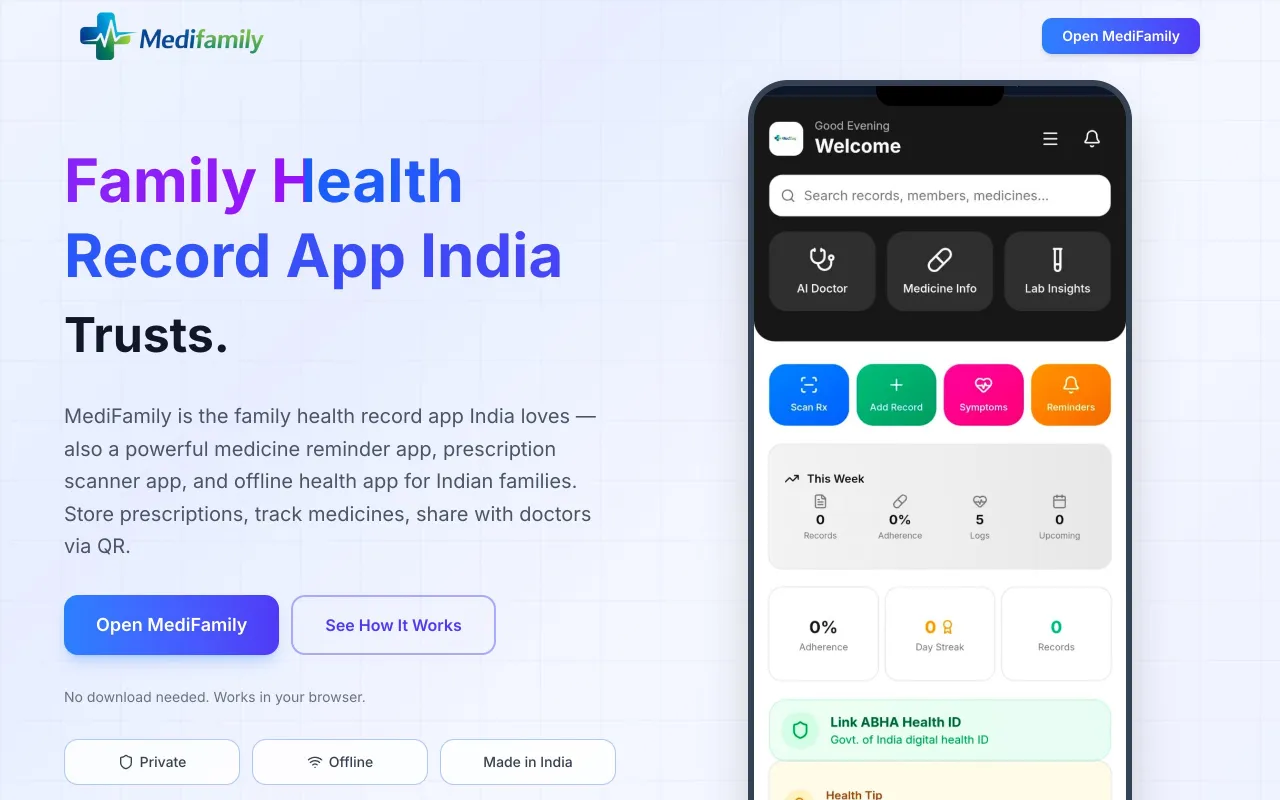 Screenshot of MediFamily's website · not an Ayu product
What each app is built for
MediFamily says it exists for families who lose prescriptions, forget doses and cannot reach their records when they are needed. Its About page puts it plainly: "We don't compete with Eka Care. We serve the 65 Crore Indians they can't reach." That figure, and the TRAI, WHO and NIH numbers on its home page, are given without a link, so we cannot check them. The idea behind them is sound. A great deal of health information in India sits on paper, and a lot of phones have a weak connection.
The business model, as far as its pages say, is none yet. It is "fully open source", "early access", free, with no ads and no analytics. The developer is named: Sandeep Pandey of 2XG, Bangalore. The policy lists a personal email address for deletion requests. That is a very different kind of company from a venture-backed app, which has good and bad sides. You can read the code. You are also relying on one person for support, security fixes and continuity.
Ayu is built around one idea: the paper you already have should become something you can read, search and ask about. It is free to use, has no ads and will not add them. It is a newer, smaller app, not an ABDM-integrated record app today, and one person per account on the free plan.
The difference in purpose explains most of what follows. MediFamily is a store for family records that works anywhere. Ayu is a reader of the records that already exist.
Is MediFamily an app or a website?
Both, in a way, and it matters. MediFamily is a progressive web app. You open app.medifamily.in in a browser. The page asks you to sign in with Google or an email and password, and offers an "Install MediFamily App" prompt, which adds an icon to your home screen.
That has real advantages. There is nothing to download from a store, it works on any phone, and updates arrive without you doing anything. It also has costs that its own policy spells out:
- Your records live in the browser's storage. The policy says: "Clearing browser data will permanently delete your health records unless they have been synced to the cloud."
- iPhone is the weak spot. The policy says Safari on iPhone "may also automatically evict IndexedDB data under storage pressure". It recommends keeping cloud sync on.
- Images stay on the device. Prescription and lab images are kept as compressed blobs in the browser (500 KB each, up to 10 per record) and are not synced to the cloud. So a lost phone loses the pictures even when the text records are backed up.
- Symptom and mood entries stay local. They are never synced.
None of that is hidden. It is in section 5 of the policy. If you use MediFamily, keep cloud sync on and export or photograph anything you cannot lose.

MediFamily's screens
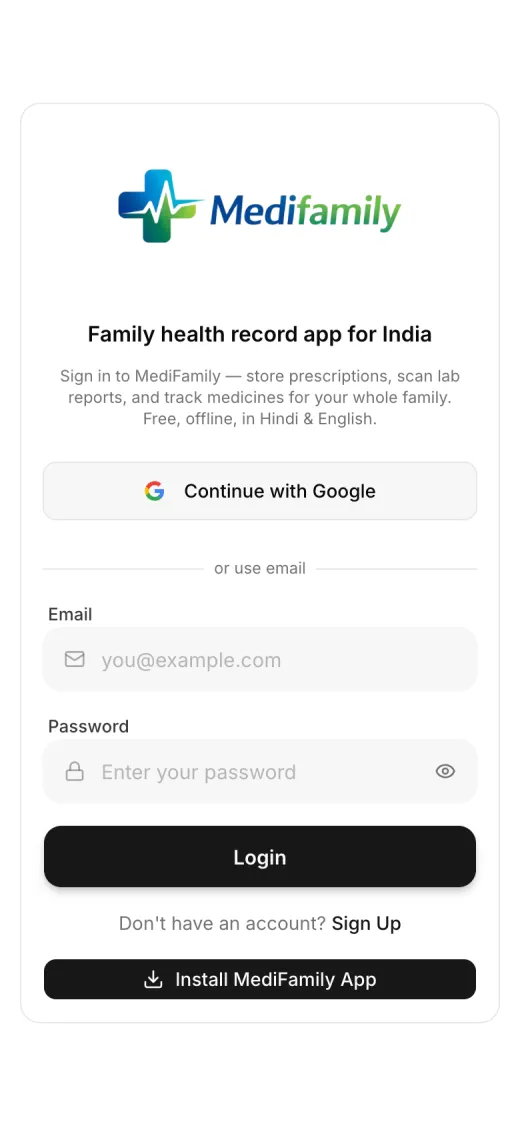
1 Sign-in page
Continue with Google or email. An Install MediFamily App prompt sits at the bottom. We did not sign up
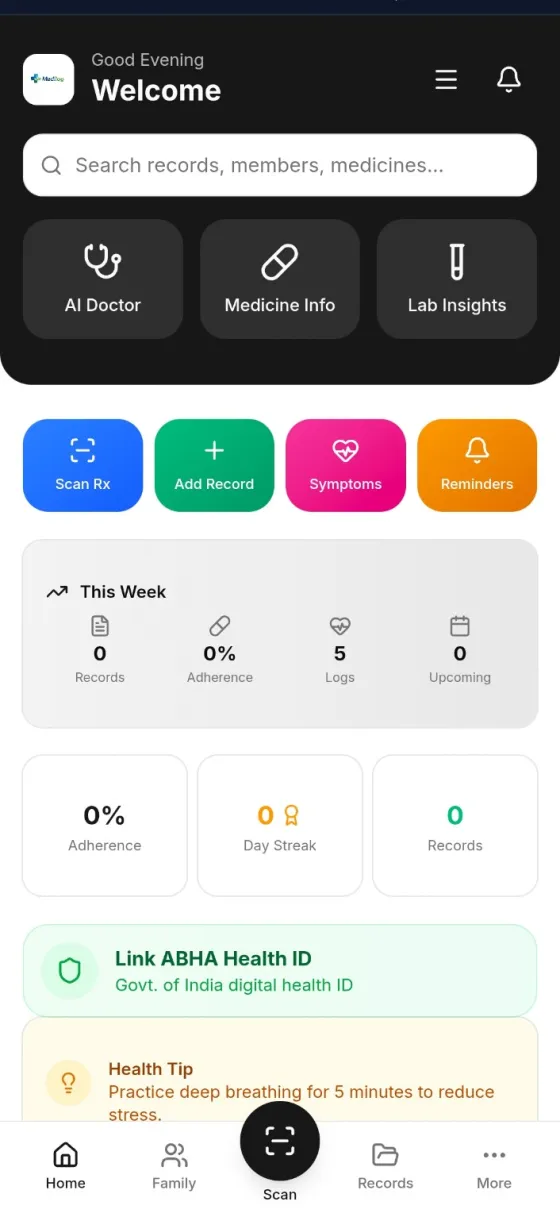
2 Home
Three AI tiles, four quick actions, a weekly summary, a streak counter and a Link ABHA Health ID card. This is MediFamily's own image of an empty account
Feature by feature
Getting records in
MediFamily's three steps are add your family, store everything, access anywhere. For a prescription you tap Scan Rx. Its pages say the AI "extracts medicines, dosage, and instructions" from Hindi or English prescriptions, handwritten or printed, using Google Gemini plus an OCR step that runs in the browser (Tesseract.js). You can also add a record by hand. Its policy lists the record types it holds: prescriptions, lab reports, vaccination records, bills and discharge summaries, plus medicines and vitals (blood pressure, blood sugar, weight, temperature and SpO2).
Ayu has you scan with the camera or upload photos and PDFs, and it takes the same range of documents. The difference is the reading step. Ayu's AI is built to read handwritten as well as printed prescriptions and pulls out the doctor, the date and each medicine. It can still get a word or a dose wrong, so check the extracted details against the original, which stays in the app. Each document also gets a plain-language summary.
We did not test MediFamily's scanner. Its pages give no accuracy figure for it, which is the honest thing to do. Ayu does not publish one either.
Starting from the home screen
MediFamily
MediFamily's home: Scan Rx, Add Record, Symptoms and Reminders as four large buttons, with AI Doctor, Medicine Info and Lab Insights above them.
 Ayu
Ayu


Ayu starts from the camera. The photo becomes medicines, doctor and date.
- 1 Open the app
- 2 Photograph a document
- 3 Ayu reads it
Reading what is inside
MediFamily's AI does three jobs on top of the scan. Lab Insights analyses a lab report image. Medicine Info identifies a medicine from a photo. AI Doctor answers health questions with your family member's age, allergies and current medicines as context. The About page says AI Doctor is not a substitute for professional advice, and the policy lists the models: gemini-2.5-flash, gemini-2.5-pro and gemini-3-flash-preview.
Ayu's AI reads documents on upload and writes a plain-language summary. Ask Ayu then answers from your own records and can show which of your documents it used. You can attach up to three of your own records to a question. It is not medical advice, and chat needs internet.
The two designs differ in a way that matters for a family with many records. MediFamily's AI tiles are tools you open when you have a question. Ayu reads every document the moment it arrives, so the history is built before you ask.
Finding a record later
MediFamily has a search box ("Search records, members, medicines...") on the home screen and a Records tab. We did not see a month view or a timeline in what it publishes, and we have not used the Records tab.
Ayu gives three routes. Browse the Documents tab, scroll the month-by-month Medical History, or search by name, doctor or hospital, where matching is forgiving of spelling. Or ask a question such as "what did the doctor prescribe for my cough in June?".
Sharing with a doctor
MediFamily's sharing is one of its best features. You generate a time-limited QR code, 24 hours by default and configurable, and the doctor scans it. They see a read-only view of the records you picked, and they do not need an account. You can revoke the link at any time, and access is logged by timestamp. What a doctor sees: the family member's name, blood group, allergies and conditions, the records and the medicines. Not your email, user ID or reminders.
Ayu shares a single document by a link or QR code that expires in 30 minutes. MediFamily shares a profile and records for a longer, adjustable window, with revocation. For a regular specialist visit that is more useful.
The emergency card
MediFamily's emergency health card shows blood group, allergies and current medicines on one screen and can be shared on WhatsApp. Ayu does not offer an emergency card. If that is what you want, MediFamily has it.
Reminders
MediFamily sends push notifications at the times you set and tracks adherence, with streaks and a weekly summary on the home screen. Ayu sets medicine reminders from a prescription, and you can ask for them in chat. Neither alerts a relative on a missed dose, as far as the pages we read say.
ABHA
MediFamily shows a "Link ABHA Health ID" card on its home screen, stores the ABHA ID number if you link it, and says it does not store a raw Aadhaar number. We did not see how the link works, and we could not confirm any ABDM certification, so we do not treat it as one. Ayu's ABHA creation and linking is planned for November 2026 and is not live today. For ABHA today, see our ABHA guide.
Languages
MediFamily says it works in Hindi and English, and that its scanner reads both. We did not see a language list for the app itself. Its privacy policy is published in English, with Hindi marked "coming soon". Ayu is in nine app languages.
Where MediFamily's pages disagree
| Topic | What its pages say |
|---|---|
| Where your data lives | Home page: "Data Stays On YOUR Phone". Policy: records sync to Supabase (AWS Mumbai) every 30 minutes when online, with symptom entries and images excluded |
| AI and India | Home page: "Made in India". About page: cloud backup in Mumbai, data "doesn't leave India for storage". Policy section 8: prescription images, lab images and your family member's name, age, blood group, allergies, conditions and medicines go to Google Gemini, "may be processed outside India" |
| Scale | Home page: "500+ Families Trust MediFamily" and "4.8 Rating". No source for either |
| An ICMR quote | The home page shows a quote attributed to the Indian Council of Medical Research, "Digital Health Report 2024". It gives no link or report title, so we could not check it and do not repeat it |
| Comparison table | A table of ticks against Practo, 1mg and Apollo 24 |
| "Open source" | Site says the codebase is open source and publicly auditable. We did not audit it |
We do not read these as bad faith. A solo developer's marketing page was written fast, and a policy is the place where the details live. The policy is the more careful document. Use it.
Privacy and data
| MediFamily | Ayu | |
|---|---|---|
| Where records are stored | On your device (browser database) first. Optional cloud backup on Supabase, hosted on AWS Mumbai | Google Cloud servers in Mumbai, India |
| AI and cross-border | Google Gemini receives images and health context for AI features, and may process them outside India (stated in its policy). OCR text extraction runs in your browser | AI features send document content to an AI provider, with your consent |
| Analytics | None. No Google Analytics, Mixpanel, crash reporting or ad networks, per its policy | See Ayu's privacy policy |
| Encryption | HTTPS/TLS 1.2+ in transit; AES-256 at rest via Supabase | Encrypted in transit and at rest |
| Access control | Row Level Security so each query is scoped to your user ID | Account sign-in |
| PIN lock | Optional 4-digit PIN with 5-minute auto-lock | See the app |
| Ads | None | Ayu has no ads and will not add them |
| Deleting data | Delete individual records in the app; for full account deletion, email the developer | You can delete your account from the app |
| Breach notice | Data Protection Board of India within 72 hours | See Ayu's privacy policy |
| Who you are trusting | One named developer; the code is said to be open | A company |
Two points to take from it. First, MediFamily is unusually specific about what it sends where, down to the model names. That is a strength. Second, the cross-border step is the one most families miss: when you scan a prescription with the AI, the image goes to Google. The policy says to avoid putting a full name together with an Aadhaar or ABHA number into an AI query.
For a wider checklist of questions to ask any records app, read medical record security in India.
Price and what is being sold to you
MediFamily: free during early access. No ads. The terms say paid premium features are planned, and that it will give "reasonable advance notice" before any pricing change. The FAQ says at least 30 days. Nothing is sold around the app. The risk is not a bill. It is that a free project run by one person may change, slow down or stop. Export what matters.
Ayu: Ayu is free to use. The only thing Ayu charges for is the family plan, from ₹99 a month, which adds profiles for family members. Ayu has no ads and will not add them.
Real-life scenarios
A joint family with six people and one weak connection. MediFamily. One login, unlimited members, offline use, and an emergency card each. This is what it was made for.
A parent with five years of mixed paper: lab reports, scans, a discharge summary. Ayu. The value is in reading and ordering many kinds of document.
A specialist visit next week. Either. MediFamily's QR share gives the doctor a read-only view for a day. Ayu shares one document for 30 minutes and answers "what did I take last time" from your history.
An iPhone with little free storage. Careful with MediFamily. Its own policy says Safari may evict stored data, so keep cloud sync on. Ayu keeps records on your account in the cloud and caches recently opened ones on the phone, so they come back when you change phones.
You want an app from a store with a company behind it. Ayu.
Where MediFamily is stronger
- It is free for the whole family, with unlimited members.
- It works offline by design, not as a fallback.
- Time-limited QR sharing with revocation and no doctor account.
- An emergency card with blood group, allergies and medicines.
- A clear privacy policy that names its vendors and its limits.
- Open source, so the data handling can be audited.
- No ads and no analytics.
Where Ayu is stronger
- It reads lab reports, scans, discharge summaries and bills as well as prescriptions.
- A month-by-month Medical History, a Documents tab and search.
- Chat that answers from your own records and shows its sources.
- A plain-language summary for each document.
- A native app on Google Play and the App Store, with a company behind it.
- Records on your account and recently opened ones cached on the phone, so they come back when you change phones.
- Nine app languages.
Which should you choose
- Free, whole family, often offline: MediFamily.
- Mixed records you cannot make sense of: Ayu.
- Both: use MediFamily's emergency card and reminders for the family, and Ayu to read and search the full file.
- ABHA today: neither has a confirmed ABDM-certified flow in the pages we read. Use the official portal and see best PHR apps in India.
Related: Tapd.ai vs Ayu, DRiefcase vs Ayu, Eka Care vs Ayu, how to digitise medical records and the best app to store medical records in India.
Frequently Asked Questions
Common questions about MediFamily and Ayu
Disclaimer
This comparison is written by the team that builds Ayu. Facts about MediFamily come from its own public website, privacy policy, terms and About page, its public sign-in page and its own app image, read on 7 October 2026, and may have changed since. We did not create an account or test its scanning, chat or sync. Neither app gives medical advice or replaces a doctor. Check every extracted medicine and dose against the original prescription.